Waitlist Information
Waitlist Information
Elon offers a registration waitlist system for most undergraduate courses.
Waitlists are not used on courses with individualized instruction such as music lessons, independent study, or research.
What is a waitlist?
If your preferred section was filled before you were able to enroll, you may add yourself to the waitlist. A waitlist allows you to put yourself on a list to be notified IF a seat opens in a full course.
It DOES NOT guarantee that you will get a seat.
Most sections that fill DO NOT re-open.
It DOES NOT mean that other sections will be added. You SHOULD register for another open section or open course in order to stay on track to graduate on time.
How do I add myself to the waitlist?
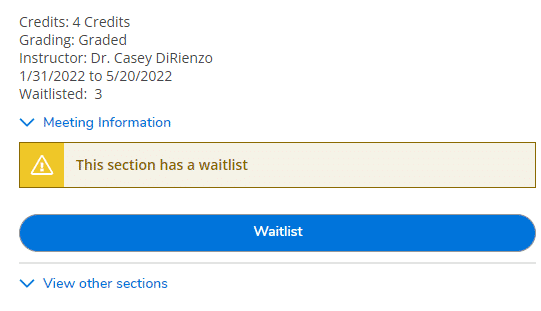
To do this, navigate to the Schedule tab within Plan & Schedule. The course will be listed in red on your calendar. Along the left side of the screen, you will find a tab associated with that specific course. Select the blue Waitlist button to add yourself to
the waitlist for that specific section.
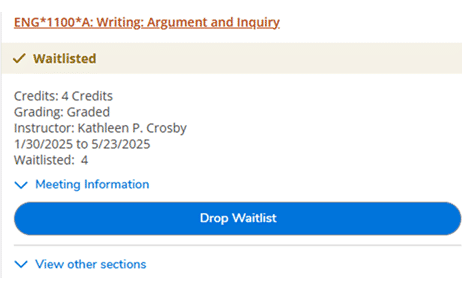
To verify you are on the waitlist, the status bar at the top should read “Waitlisted” with a ✓ and the blue action button changes to “Drop Waitlist”.
What happens when a seat opens?
If you are next on the waitlist and a seat opens up, you will receive an email from registrar@elon.edu with the Subject: Waitlist- Space Available. You must take action to claim your spot in the course.
- You have until 11:59 PM of the following day to claim your spot.
- This process runs 24 hrs a day, 7 days a week including weekends
and holidays. - If you do not act before your time expires you will lose your spot
on the waitlist.
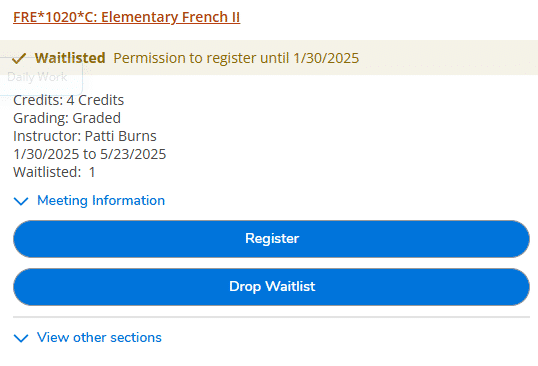
Once granted permission, return to Plan and Schedule in OnTrack. In your course list, the option to register should now appear above the Drop Waitlist button.
What happens my permission expires?
Students granted permission have one day to complete registration for a waitlisted course. If they do not register during this window, they lose their position on the waitlist and the system will move on to the next student on the list. Students who miss this window, can re-add themselves to the waitlist. This does not reinstate your previous position.
Will I know where I am on the waitlist?
No, you will not know where you are on the waitlist, however you can see how many other students have waitlisted a section.
Can I waitlist multiple sections of the same course?
Yes, you can waitlist multiple sections of the same course. If you are granted permission for one section and choose to register, you will be dropped from the other waitlists of the same course. If desired, you may re-add yourself to the additional waitlist, but your previous positions are not maintained.
It is suggested that you always register for an open section first, even if it is not your preferred choice, before choosing to waitlist other sections.